Computers: Parts
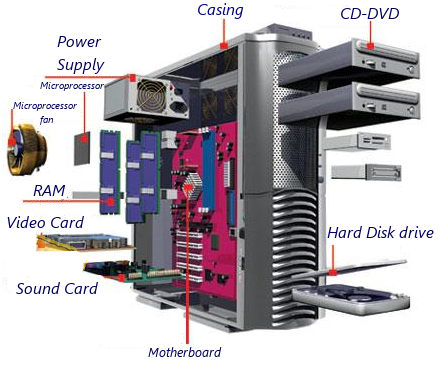
Computers are composed of two important parts: hardware and software.
Hardware is the electronic or physical parts of the computer. That is, it is the parts you can touch. Examples are:
The motherboard that contains the microprocessor, the RAM, the sound card etc.
The power supply whose job is to supply the correct amount of current and tension to the different parts of the computer.
The hard disk, where the programmes are stored.
The entry and exit peripherals like the mouse and keyboard
The exit peripherals like the monitor.
Others, like the router, are used to both receive and send data by internet.
The motherboard that contains the microprocessor, the RAM, the sound card etc.
The power supply whose job is to supply the correct amount of current and tension to the different parts of the computer.
The hard disk, where the programmes are stored.
The entry and exit peripherals like the mouse and keyboard
The exit peripherals like the monitor.
Others, like the router, are used to both receive and send data by internet.
Motherboard
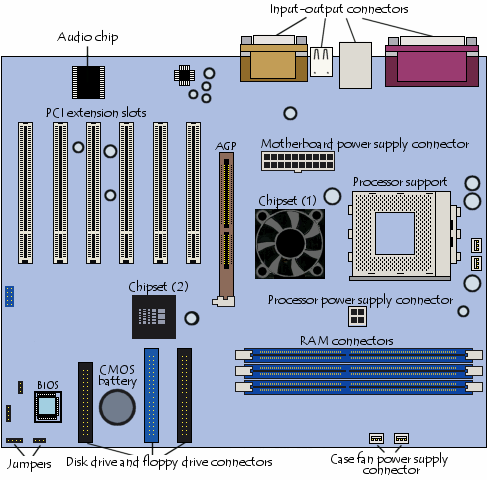
In the picture we can see a PC motherboard. The following elements are important to mention.
1. The processor support where the processor which does the most important jobs in the computer is housed.
1. The processor support where the processor which does the most important jobs in the computer is housed.
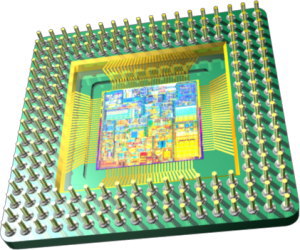
In the right, you can see a microprocessor from a computer.
It undertakes the mathematical and logical functions of the programmes, as well as other functions.
Depending of the speed and on the number of integrated transistors the microprocessor is more or less powerful. That is, it can do more jobs in less time.
This part works so hard that it needs a heatsink next to its own fan.
Depending of the speed and on the number of integrated transistors the microprocessor is more or less powerful. That is, it can do more jobs in less time.
This part works so hard that it needs a heatsink next to its own fan.
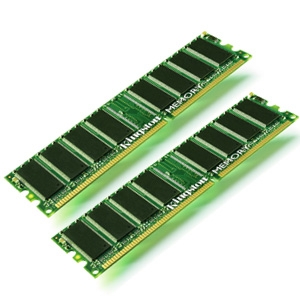
RAM (Random Access Memory)
Is the memory which uses semiconductors and can be read and written on by microprocessors and other hardware devices.The memory chips are small black rectangles that are usually soldered in groups to plaques with pins or contacts. The difference between RAM and other types of storage memory, like disks or hard disks, is that RAM is much faster and is erased when the computer is turned off.
The chipset
It is an electronic component whose job is to manage data transfers between the electronic components of the computer such as the processor or the memory.
The BIOS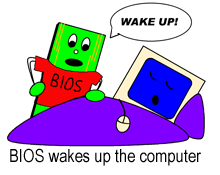
Short for Basic Input - Output System is the first programme to work when the computer is turned on.It uses data to find out what the system's hardware configuration is.
The BIOS is stored in ROM ( short for read-only memory ).
Connectors

Most motherboards have the following connectors
- A parallel port, mainly for connecting old printers
- A serial port. It was used for connecting old periphericals
- USB ports, for connecting more recent peripherals
- RJ45 connector used for connecting the computer to a network.
- VGA connector for connecting a monitor.
- Line-In, Line-Out and microphone, for connecting sound speakers or a microphone. These connectors are included in the sound card.
Peripherals
A driver is a file that tells the operating system how data should be exchanged between the peripherals and the computer.
Drivers are different for every peripheral and every operating system. A driver for a digital camera in Windows won't work in Linux.
Nowadays it is very easy to connect a peripheral to a computer because computer systems recognise them easily (plug and play) and if it needs you to incorporate the driver, it will tell you using a menu.
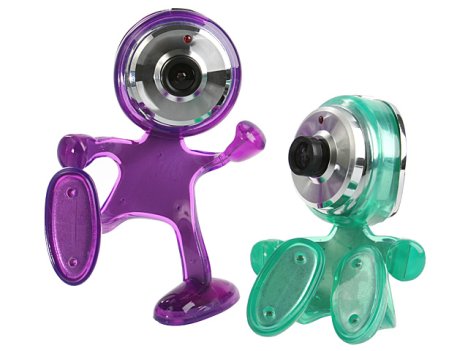
On the right you can see some webcams, used for video conferences.
Drivers are different for every peripheral and every operating system. A driver for a digital camera in Windows won't work in Linux.
Nowadays it is very easy to connect a peripheral to a computer because computer systems recognise them easily (plug and play) and if it needs you to incorporate the driver, it will tell you using a menu.
On the right you can see some webcams, used for video conferences.
The monitor
The monitor is a peripheral that shows all the information in visual form; for example, a letter, photo or film.
The most important characteristics of the monitor are:
The resolution:
This is the number of dots that the monitor can represent on the screen, in horizontal x vertical. Therefore, a monitor whose maximum resolution is 1024x768 points can represent up to 768 lines horizontally each with 1024 dots. It can probably also produce inferior resolutions like 640x480 u 800x600.
The greater the resolution of a monitor, the better the quality of the image and the greater the quality (and price) of the monitor. The resolution should be appropriate to the size of the monitor; it's normal for a 14” or 15” not to offer 1280x1024 dots, but that is the minimum you expect from a 17” or bigger monitor.
The most important characteristics of the monitor are:
The resolution:
This is the number of dots that the monitor can represent on the screen, in horizontal x vertical. Therefore, a monitor whose maximum resolution is 1024x768 points can represent up to 768 lines horizontally each with 1024 dots. It can probably also produce inferior resolutions like 640x480 u 800x600.
The greater the resolution of a monitor, the better the quality of the image and the greater the quality (and price) of the monitor. The resolution should be appropriate to the size of the monitor; it's normal for a 14” or 15” not to offer 1280x1024 dots, but that is the minimum you expect from a 17” or bigger monitor.
The monitor: Scren Refresh
You can compare it to the number of frames per second in a film, so it should be as high as possible. It is measured in Hz (Hertz) and should be more than 60Hz and preferably 70 or 80 Hz. From this number upwards the image on the screen is very stable, it doesn't blink and it doesn't affect our vision as negatively. If the refresh is very slow, we would see the images in bits.
It is the graphics card that provides these refreshes but it is the monitor that presents them. If we use a screen refresh that the monitor can't support we can damage the computer, so we need to know our computer's capacity very well and we should read the manual very carefully.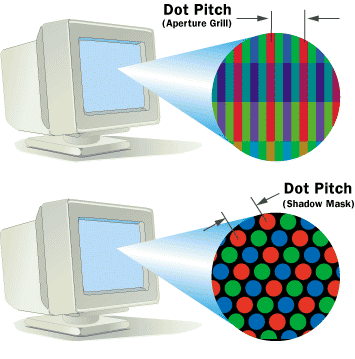
It is the graphics card that provides these refreshes but it is the monitor that presents them. If we use a screen refresh that the monitor can't support we can damage the computer, so we need to know our computer's capacity very well and we should read the manual very carefully.
Dot pitch (size of dots)
This parameter measures the sharpness of the image, measuring the distance between two points in the same colour. It is fundamental when the resolution is high. Sometimes it is differently horizontally to how it is vertically or sometimes it is an average value, depending on the particular placing of the dots of colour on the screen and on the type of grid used to direct the electron beams.
The minimum we want is 0.28mm, and it shouldn't be higher except in large format monitors for presentations where the size of the image is more important than the resolution.
The minimum we want is 0.28mm, and it shouldn't be higher except in large format monitors for presentations where the size of the image is more important than the resolution.
The graphics card
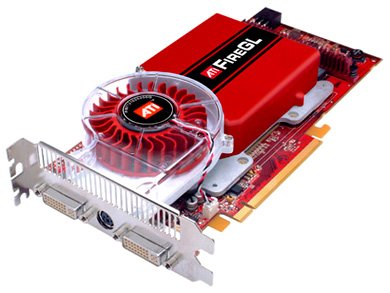
This is what transmits to the monitor the graphic information which should appear on screen. To do this it performs two operations:
* It interprets the data that comes in from the processor, it orders them and calculates how to present them on the screen in the form of a quite large rectangle made up of individual dots of different colours (pixels).
* It takes the digital data resulting from the above operation and transforms it into an analog signal that the monitor can understand.
These two processes are normally performed by one or more chips: the graphic microprocessor (the brain of the graphics card) and the analog-digital converter or RAMDAC. Sometimes there are other accessory chips for other functions or sometimes there is only one chip that performs every function.
The microprocessor can be very powerful or advanced, sometimes even more advanced and powerful than the computers own microprocessor

These two processes are normally performed by one or more chips: the graphic microprocessor (the brain of the graphics card) and the analog-digital converter or RAMDAC. Sometimes there are other accessory chips for other functions or sometimes there is only one chip that performs every function.
The microprocessor can be very powerful or advanced, sometimes even more advanced and powerful than the computers own microprocessor
The Mouse

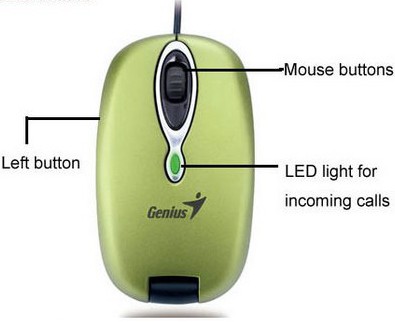
The mouse is a pointing device generally made of plastic.
It is used by one of the hands of the computer user and it detects this hand's movement in two dimensions on the level surface the mouse is on.
This movement is then reflected on the screen with an arrow or pointer.
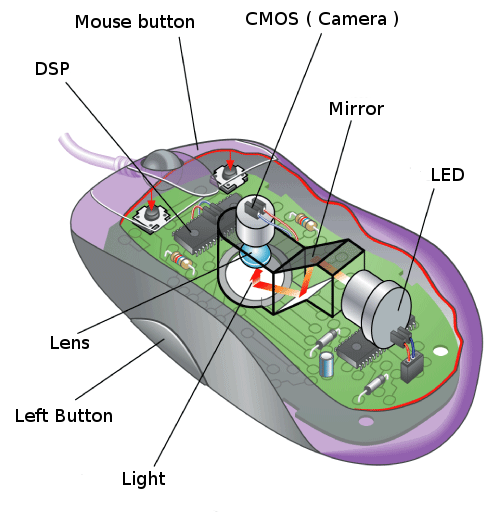
It can work on almost any surface. It has a small red diode than bounces the light from a surface onto a CMOS sensor (complimentary metal-oxide semiconductor). The CMOS sensor sends every image to a DSP processor (Digital Signal Processor) to be analysed. The DSP, operating at 18MIPS (millions of instructiosn per second) can detect forms in these images and can see how these forms have moved between images. Based on the changes seen in a sequence of images the DSP works out how the mouse has moved and it sends the corresponding coordinates to the computer.
Printers
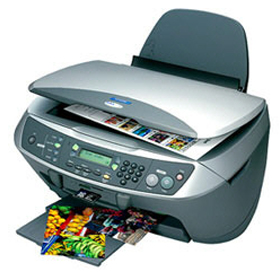
Printers are peripherals that allow us to print text and images from a digital archive.
The quality of a printer depends on:
The resolution or number of dots an inch that the machines prints.
The speed of the printing that is measured in pages per minute.
Printers are normally connected to the USB port.
The quality of a printer depends on:
The resolution or number of dots an inch that the machines prints.
The speed of the printing that is measured in pages per minute.
Printers are normally connected to the USB port.
Types of printer
Inkjet printer. These printers print using one or various ink cartridges that contain between 3 and 30 ml. Some print in very high quality, almost as good a quality as the Laser printers. See photo on the left.
 Laser Printer.
These are the best quality printers and their prices vary widely, depending on the model.I They are the method of printing used in printing presses and they work in a similar way to photocopiers.
The quality of the printing and the speed of laser printers is really surprising.
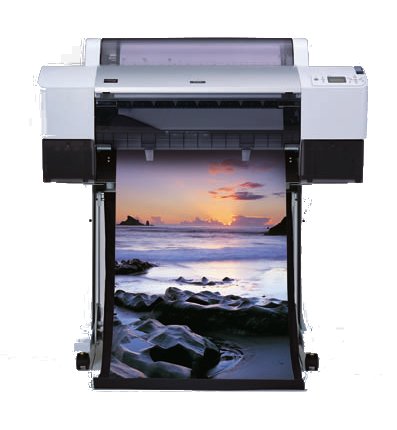
Plotter. These printers are specialized in vector drawings and very common in architects studios. See photo on the left.
The quality of the printing and the speed of laser printers is really surprising.
Plotter. These printers are specialized in vector drawings and very common in architects studios. See photo on the left.
Scanner
This is the process used to copy a document:
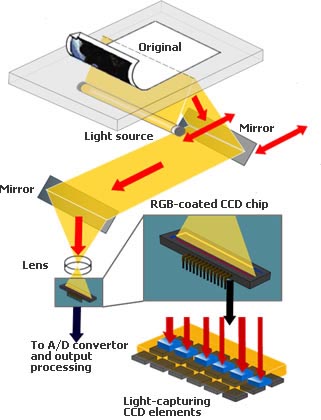
Light up the image with a spotlight. The light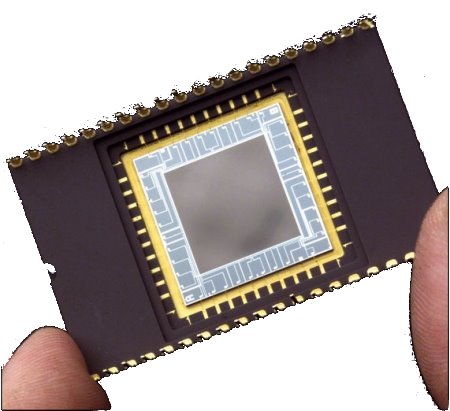 reflected off the object is directed, using mirrors, to the CCD device, which converts it into electronic signals. Then these signals are converted to a digital format thanks to a analog-digital converter that transmits the subsequent flow of bits to the computer.
Light up the image with a spotlight. The light
reflected off the object is directed, using mirrors, to the CCD device, which converts it into electronic signals. Then these signals are converted to a digital format thanks to a analog-digital converter that transmits the subsequent flow of bits to the computer.
The CCD is the most important element of a scanner. it is an electrical component that reacts to light. It transmits more or less electricity depending on the intensity and colour of the light.
It's like an electronic eye and it is also used in other devices, like cameras and videos. The quality of the scanning depends on the refinement of the CCD; the analog-digital converter and adequate cleaning.
It's like an electronic eye and it is also used in other devices, like cameras and videos. The quality of the scanning depends on the refinement of the CCD; the analog-digital converter and adequate cleaning.
Software

Interesting and amazing how your post is! It Is Useful and helpful for me That I like it very much, and I am looking forward to Hearing from your next..
ReplyDeletePurchase Computer Parts in Nepal
Interesting info, do you know where I can find similar information? The complete guide to the way to get Hotmail account through our Hotmail sign up section.
ReplyDeleteWow, cool post. I'd like to write like this too - taking time and real hard work to make a great article... but I put things off too much and never seem to get started. Thanks though. click here
ReplyDeleteI have read this blog post. Very informative blog site. We are niagara Onsite Computer Repair Experts. We Provide onsite PC service to many business’s and residential offices as well as home users. We repair Mac, PC, Laptop and we service all makes and models onsite. We come to your home and office to fix your computer issues. We provide the highest quality repairs everytime for everyone! Check out our service at st.catharines laptop repair
ReplyDeleteGood Articel For Gaming
ReplyDeleteRajaidr
Ratuidr
Judi Bank Online 24jam
Agen Poker Bank Online 24jam
Agen BandarQ Bank Online 24jam
Link Alternatif Rajaidr
Agen Bandar Kiu
Bandar Kiu Terpercaya
Rajaidr
Ratuidr
Judi Bank Online 24jam
Link Alternatif Rajaidr
BandarQ
Bandar Kiu
Agen Bandar Kiu Bank Online 24jam
Rajaidr
Ratuidr
Situs Poker Online Terpercaya
Situs Poker Online
Agen Poker
Agen Domino
Agen BandarQ
Agen Bandar Kiu
Domino 99
Poker Online Terpercaya
Rajaidr
Ratuidr
good information share reallyartcut 2009 software free downlaod
ReplyDelete4liker app Download
himzi auto liker apk
Great post I would like to thank you for the efforts you have made in writing this interesting and knowledgeable article.
ReplyDelete사설토토사이트
ReplyDelete103 Nice answers in replace of the question with real point of view and explaining about that.
http://www.onbiz.com
At some point couple of instructive online journals turn out to be exceptionally useful while getting pertinent and new data identified with your focused on range. As I discovered this blog and welcome the data conveyed to my database. Logistics Software
ReplyDeleteYour work is very good and I appreciate you and hopping for some more informative posts. Thank you for sharing great information to us.
ReplyDeleteJudi Online Uang asli
I'd be trampled if all sites gave articles like these awesome articles.
ReplyDeletestart a new business
This article is actually remarkable one it helps many new users that desire to read always the best stuff.
ReplyDeletestart a new business
The blog is good enough, keep up writing such type of posts.
ReplyDeletebest UI UX design
W3Computercourse Online Training How To Do Learn Computer Education Online Service Course >>>>> Download Now
ReplyDelete>>>>> Download Full
W3Computercourse Online Training How To Do Learn Computer Education Online Service Course >>>>> Download LINK
>>>>> Download Now
W3Computercourse Online Training How To Do Learn Computer Education Online Service Course >>>>> Download Full
>>>>> Download LINK nl
I read your blogs regularly. Your humoristic way is amusing, continue the good work!
ReplyDeleteThe Changing World Order